
PKRSpin Deposit Guide
Funding your PKRSpin account is a straightforward process designed specifically for mobile users in Pakistan. Whether you are adding funds to participate in new game categories or looking to claim active daily promotional bonuses, understanding the deposit workflow ensures your transfers remain fast, secure, and hassle-free.
This comprehensive guide breaks down the step-by-step deposit process, supported local payment gateways, processing timeframes, transaction verification tips, and practical solutions for common payment delays.
Step-by-Step Deposit Process
Adding funds to your PKRSpin wallet takes under two minutes when following these simple steps:
- Log Into Your Account: Open the official PKRSpin application or visit the web portal and sign in using your registered mobile phone number and password.
- Navigate to the Wallet: Tap the Deposit or Wallet icon located prominently on your main account dashboard.
- Select Your Payment Channel: Choose your preferred payment option (e.g., EasyPaisa, JazzCash, or Local Bank Transfer).
- Enter Deposit Amount: Type the exact amount you wish to transfer into your account while adhering to the minimum platform limits.
- Copy Receiver Details: Copy the official account title and account number displayed on the PKRSpin payment screen.
- Execute Transfer in Mobile App: Open your personal mobile financing app (such as the EasyPaisa or JazzCash app), complete the transfer to the copied account details, and save the receipt or Transaction ID (TID).
- Submit Transaction Proof: Return to the PKRSpin application, enter the unique Transaction ID (TID) or upload a screenshot of the payment receipt, and tap Confirm Deposit.
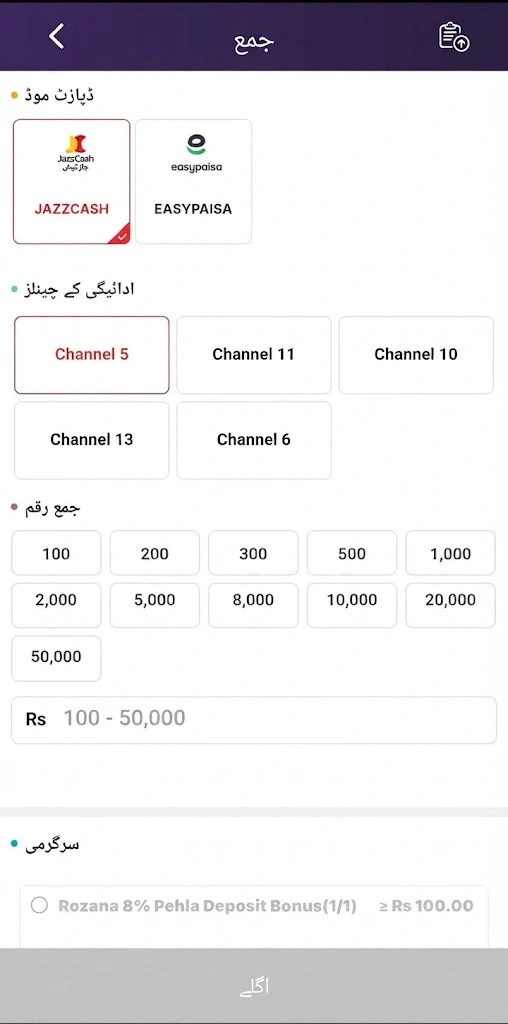
Supported Deposit Methods
PKRSpin integrates directly with widely used local electronic wallet services and online banking systems to facilitate effortless local currency deposits:
- EasyPaisa: Direct mobile wallet transfers via active mobile accounts.
- JazzCash: Swift digital wallet funding directly through your registered JazzCash account.
- Local Bank Transfers: Instant online banking transfers supporting major commercial banks across Pakistan.
Minimum Deposit Amount
To keep gaming accessible for all users, PKRSpin maintains low entry limits:
- Minimum Deposit Limit: Users can start funding their accounts with a minimum deposit of PKR 100 to PKR 500 (depending on the active payment gateway and current app promotional terms).
- Maximum Limits: Maximum single-transaction deposit limits vary depending on your verified mobile wallet tier limits (e.g., daily EasyPaisa/JazzCash transaction caps).
Deposit Processing Timeframe
- Standard Processing Time: Most automated deposits process instantly to within 3 to 10 minutes.
- Peak Times: During heavy server traffic or local banking maintenance windows, processing may occasionally take up to 30 minutes.
Complete Solutions & Troubleshooting
Why is my deposit pending?
A pending status usually occurs due to one of three common reasons:
- System Verification Delay: Automated verification systems are cross-referencing your submitted Transaction ID (TID) with incoming banking logs.
- Network Congestion: Temporary delays on local banking or mobile wallet servers (EasyPaisa/JazzCash) during high-traffic hours.
- Incorrect TID Entry: Typographical errors made when entering the Transaction ID into the app submission field.
What should I do if my deposit failed?
If your deposit attempt fails or is rejected:
- Double-check that your account balance has sufficient funds to cover the attempted deposit.
- Verify that you sent funds to the exact receiver details actively displayed on the app screen (receiver details update frequently for security).
- Re-attempt the transaction using an alternate payment method if a specific gateway is undergoing routine maintenance.
Is there a deposit fee?
- Platform Fee: PKRSpin does not charge any internal platform fees or hidden commission charges for making deposits.
- Provider Charges: Standard micro-fees or tax deductions enforced by local telecom operators or mobile wallet providers (EasyPaisa/JazzCash) for money transfers may apply independently.
Where can I find my Transaction ID (TID)?
Your Transaction ID is a unique numeric reference generated upon completing a payment. You can locate it:
- In SMS Confirmation: Sent directly to your mobile phone from your mobile wallet provider (e.g., EasyPaisa/JazzCash) right after transferring funds.
- Inside Mobile App History: Found under the “Transaction History,” “Statement,” or “Receipt Details” section inside your EasyPaisa, JazzCash, or bank app.
- On Payment Receipt: Displayed clearly at the top or middle of your digital transfer confirmation receipt.
Is my payment information secure?
Yes, PKRSpin protects all payment-related interactions using 256-bit data encryption protocols and secure gateway authentication. The platform never requests or stores private mobile banking PINs or OTPs. Furthermore, local payment integrations ensure all financial transfers occur within your official, password-protected mobile finance apps (EasyPaisa/JazzCash).
What should I do if money was deducted but my balance wasn’t updated?
If your mobile wallet balance was debited but your PKRSpin balance does not reflect the funds within 30 minutes, follow this escalation process:
- Locate Payment Proof: Open your mobile finance app, find the successful transaction, and take a clear screenshot showing the Transaction ID (TID), time, date, receiver account name, and exact amount.
- Access In-App Customer Support: Go to your PKRSpin dashboard and tap Customer Support or Live Help.
- Submit Escalation Request: Send your registered mobile number along with the payment screenshot and typed Transaction ID directly to a support agent.
- Allow Verification: Support agents will manually verify the payment proof against platform records and credit your balance promptly.
1 thought on “PKRSpin Deposit Guide 2026: Payment Methods”